Small business owners pour money into Google Ads every day without understanding why their ad appeared on page one yesterday and vanished today. If you’ve ever wondered how Google Ads work, what actually controls your position, your costs, and your results, this guide breaks it down. The platform looks simple on the surface: type in keywords, set a budget, and watch the clicks roll in. But the mechanics underneath are far more structured than most advertisers realize.
Google Ads is not a slot machine. It runs a real-time auction with rules that consistently reward relevance over raw spending power. That single insight changes how you approach every decision in your account. At Brandleap Agency, we walk every new paid search client through this exact framework before a single dollar goes live, because in our experience, campaigns built on a clear understanding of PPC advertising mechanics consistently outperform campaigns built on guesswork. A $500 monthly budget managed with precision can, in many cases, outperform a $2,000 budget pointed at the wrong keywords with a weak landing page.
This guide covers five things: how the auction determines your ad position, what Quality Score does to your actual costs, the main campaign types and where your ads appear, how to pick the right bidding strategy for your stage, and a practical checklist to launch your first campaign with confidence.
How Google Ads Work: The Auction That Determines Your Ad Position
Every time someone types a query into Google, an automated auction fires in roughly 200 milliseconds. Every eligible advertiser gets evaluated, ranked, and priced before the results page loads. Most beginners assume the top spot goes to whoever bids the most. It doesn’t work that way.
The Ad Rank formula in plain language
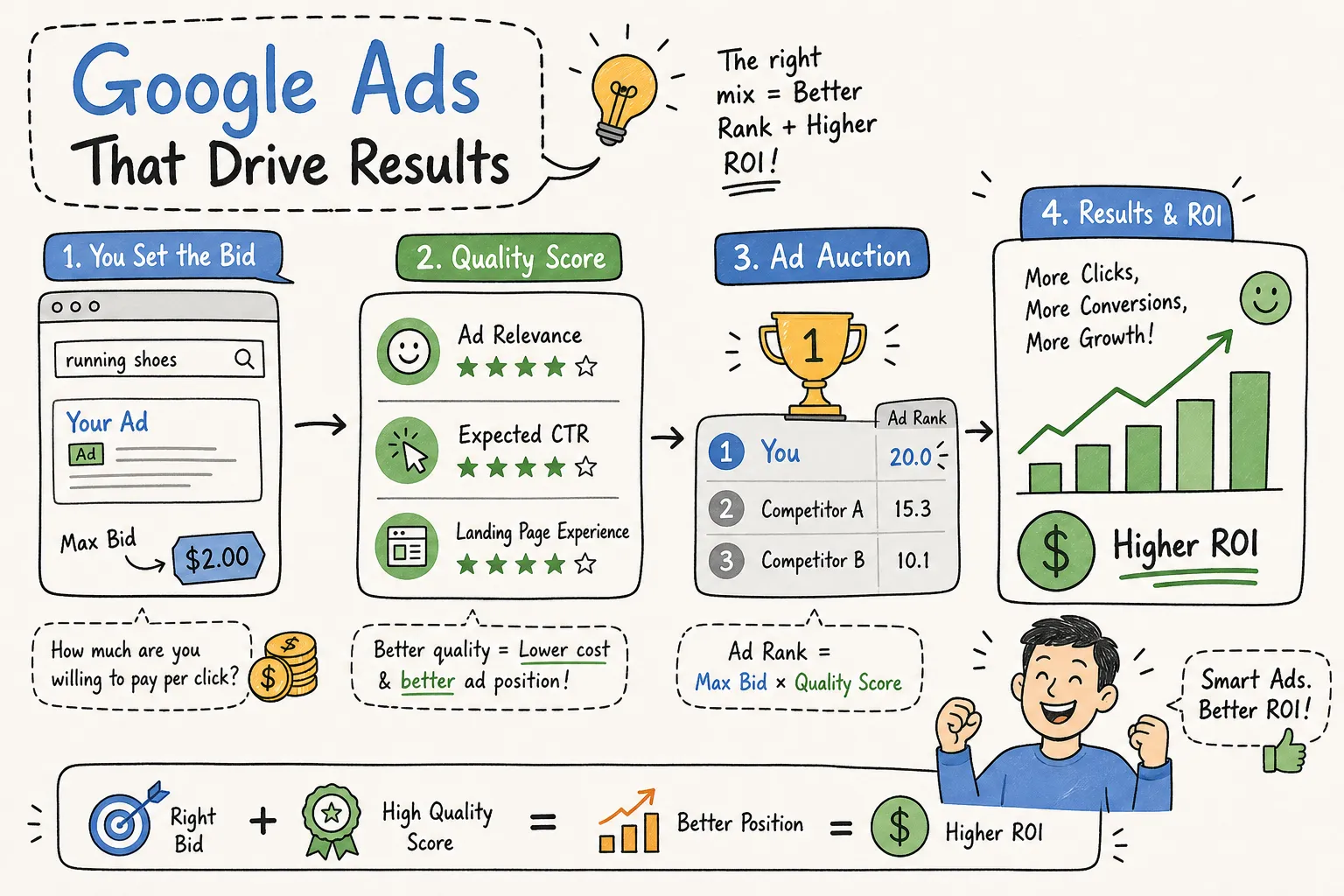
Your position in the results is determined by your Ad Rank score, which combines four inputs: your maximum CPC bid, your Quality Score, the expected impact of your ad assets, and auction-time context signals.
- Max CPC is the ceiling you set for what you’re willing to pay per click.
- Quality Score is Google’s assessment of how relevant your ad and landing page are to the search.
- Extension impact estimates how much your additional assets, sitelinks, callouts, phone numbers, will lift your click-through rate.
- Context signals adjust everything in real time based on who is searching, what device they’re using, their location, and the exact phrasing they typed.
Why the highest bid doesn’t always win
Here’s a scenario that changes how most advertisers think about bidding. Advertiser A bids $5 with a Quality Score of 8. Advertiser B bids $10 with a Quality Score of 3. Advertiser A wins the higher position because their Ad Rank is greater, even though their bid is half the size.
Beyond position, Google runs what’s called a second-price auction: you don’t pay your full Max CPC. You pay just enough to beat the advertiser directly below you, calculated as their Ad Rank divided by your Quality Score, plus one cent. This means improving your relevance is a more efficient lever than simply raising your bids, because it lowers what you pay while improving where you show up.
Quality Score: The Metric That Controls What You Actually Pay
Quality Score sits at the center of your campaign economics. A strong score gives you a cost advantage over competitors bidding higher; a weak score means you’re overpaying for every click you receive. Google assigns a 1-to-10 rating to each keyword in your account, and that number has a direct impact on both your ad position and your actual cost per click.
The three factors Google evaluates
Each Quality Score breaks down into three components, each rated as “Above average,” “Average,” or “Below average” compared to other advertisers. Expected click-through rate measures how likely your ad is to earn a click based on historical performance and how well your keywords align with the ad copy. Ad relevance measures how closely your ad reflects the intent behind the user’s search query. Landing page experience evaluates the usefulness, speed, mobile-friendliness, and content relevance of the page users land on after clicking. All three must work together: a well-written ad pointed at a slow, generic landing page will still score low, and that score will cost you.
How Quality Score lowers your cost per click
The direct cost impact is significant. A higher Quality Score means the competitor below you needs a higher Ad Rank to displace you, which means you pay less to hold your position. Two advertisers in the same position with different Quality Scores can have dramatically different actual CPCs, even when their Max CPC bids are similar.
For small businesses with limited budgets, landing page relevance is often one of the highest-leverage improvements you can make. Fixing it simultaneously raises your Quality Score and improves your conversion rate, so you get two wins from one change. Start there before touching your bids.
The Five Campaign Types and Where Your Ads Actually Appear
When you open a new Google Ads account, the platform’s default recommendations tend to favor automated campaign types. That’s not always the wrong call, but it’s rarely optimized for a first-time advertiser who needs clean, interpretable data. Understanding each format helps you choose deliberately.
Search, Display, Shopping, Video, and Performance Max
Search, Display, Shopping, Video, and Performance Max represent the core of what Google Ads offers, and understanding the difference between search ads vs. display ads alone can save you from wasting budget on the wrong traffic source.
Search ads appear on the Google results page when someone actively types a query. They are text-based, triggered by intent, and represent the highest-quality traffic in the Google ecosystem. Display ads run as visual banners across more than two million third-party websites, Gmail, and other Google-owned properties while users browse passively. Shopping ads pull from a Google Merchant Center product feed and appear above organic results with images and pricing, essential for e-commerce, but irrelevant for service businesses. Video ads run on YouTube before, during, or after content and across Google’s video partner network. Performance Max is Google’s AI-driven format that distributes ads across all five channels from a single campaign, using machine learning to find conversions wherever they’re available.
Which format makes sense for a small business starting out
The answer is Search, and it isn’t close. Search campaigns capture active purchase intent, give you granular control over which keywords trigger your ads, and produce the clearest data for a beginner to read and act on. For help deciding the broader channel strategy, see SEO or PPC for Small Business: Which Should You Invest In?, 2026.
Performance Max requires substantial historical conversion data to work properly. Handing Google’s AI a campaign with no performance history is like asking a navigator to plot the fastest route without a map. Shopping campaigns make sense only for e-commerce businesses with a clean, properly formatted Merchant Center product feed already in place. Start with Search, build your conversion foundation, and expand from there.
Choosing a Bidding Strategy That Matches Your Stage
Bidding strategy is one of the most consequential decisions in a Google Ads account, and the right answer changes as your campaign matures. The mistake most small businesses make is jumping straight to automated bidding before the account has the data those algorithms need to function.
Start with Manual CPC to build a data foundation
New accounts have no conversion history. Google’s smart bidding algorithms rely on past performance to predict future outcomes, and with nothing to learn from, they’re essentially guessing. Starting with Manual CPC keeps you in control of individual keyword bids, prevents overspending during the learning phase, and builds the conversion data that smarter strategies require.
Set the expectation internally that this phase is about data collection first. The goal is accumulating at least 30 conversions per month before you consider switching strategies, which typically takes two to four weeks depending on your budget and traffic volume.
When to switch to smart bidding and how to set your budget
Once a campaign has enough conversion data, Maximize Conversions is the natural progression. It uses Google’s real-time signals to find clicks most likely to convert within your daily budget. For businesses focused on revenue rather than lead volume, Maximize Conversion Value is the better fit. Target CPA and Target ROAS should only be activated once you have stable, verified data on your actual cost per acquisition and return on ad spend over several weeks.
For budget sizing, the practical rule is to set a daily budget of at least three to five times your target CPA. If your target CPA is $30, start with a daily budget of $90 to $150 so the algorithm has room to explore. Once you make a significant change to bids or strategy, give the campaign two to four weeks before drawing conclusions. The data needs time to stabilize, and Performance Max campaigns may need up to six weeks before results are reliable.
A Practical Checklist to Launch Your First Campaign the Right Way
Understanding the theory is only useful if it translates into action. The steps below reflect what a well-structured campaign launch looks like in practice, regardless of budget size. There are three core areas to address before you spend a dollar.
Set up conversion tracking before anything else
Conversion tracking is non-negotiable. Without it, Google’s smart bidding has no signal to optimize against, and you have no way to know whether your ad spend is generating real business outcomes. Conversion tracking captures the actions that matter: form submissions, phone calls, purchases, and page visits that indicate purchase intent.
The setup process involves installing a Google Tag on your site (directly or via Google Tag Manager), defining your conversion actions in the Google Ads interface, and verifying the tag fires correctly before you spend a dollar. This happens before the campaign goes live, not after you’ve already run through your first week of budget.
Key metrics to watch in the first 30 days
Knowing what to measure keeps you from reacting to noise. Based on current industry benchmarks, the average Google Search CPC across industries sits at approximately $2.96 in 2026, with click-through rates ranging from 3.5 to 6 percent depending on the vertical, and conversion rates ranging from roughly 2.5 to 7 percent. These figures vary significantly by industry, so treat them as directional rather than universal targets.
Click-through rate tells you whether your ad copy is resonating with searchers. Conversion rate tells you whether your landing page and offer are compelling enough to close the gap. Cost per conversion tells you whether the campaign is economically viable relative to what a customer is worth to your business.
- Low CTR: rewrite your headline or adjust keyword match types
- Low conversion rate: improve landing page relevance, load speed, or your offer
- High cost per conversion: tighten keyword targeting or raise your landing page Quality Score
Avoid major changes in the first two to four weeks. The campaign is still in its learning phase, and adjustments made too early reset that process and delay reliable data. Patience isn’t passive; it’s strategic.
How Google Ads Work, Build Campaigns on Understanding, Not Guesswork
Google Ads rewards relevance. The auction, Quality Score, and bidding strategy all feed into one another, and businesses that understand that connection use their budgets more efficiently than competitors who simply try to outspend everyone in the room. That’s true whether you’re running a $500 monthly budget or a $5,000 one.
For business owners who want expert help building pay-per-click ads that actually hit their ROI targets, Maximize ROI With Targeted PPC Campaigns, 2026, Brandleap Agency works with small businesses at every stage: account setup, conversion tracking, keyword strategy, and ongoing optimization. We don’t hand you a dashboard and disappear.
Now that you understand how Google Ads work, the next step is straightforward. Start with one Search campaign. Install your conversion tracking on day one. Let the data guide every decision from there. That’s not a complicated strategy, it’s just the right one.
For ongoing insights and guides, visit our Brandleap Agency Blog | Expert Digital Marketing Insights.