Introduction
If your team still moves blog content by hand, you are wasting time on repeat work. n8n is a workflow automation tool built to simplify content automation across different apps. It helps you connect writing, formatting, publishing, and updates into one clean process. For blog content creation, that means fewer delays, fewer formatting issues, and better control. If you want a more reliable system for daily publishing, these workflows show where to start and what to automate first.
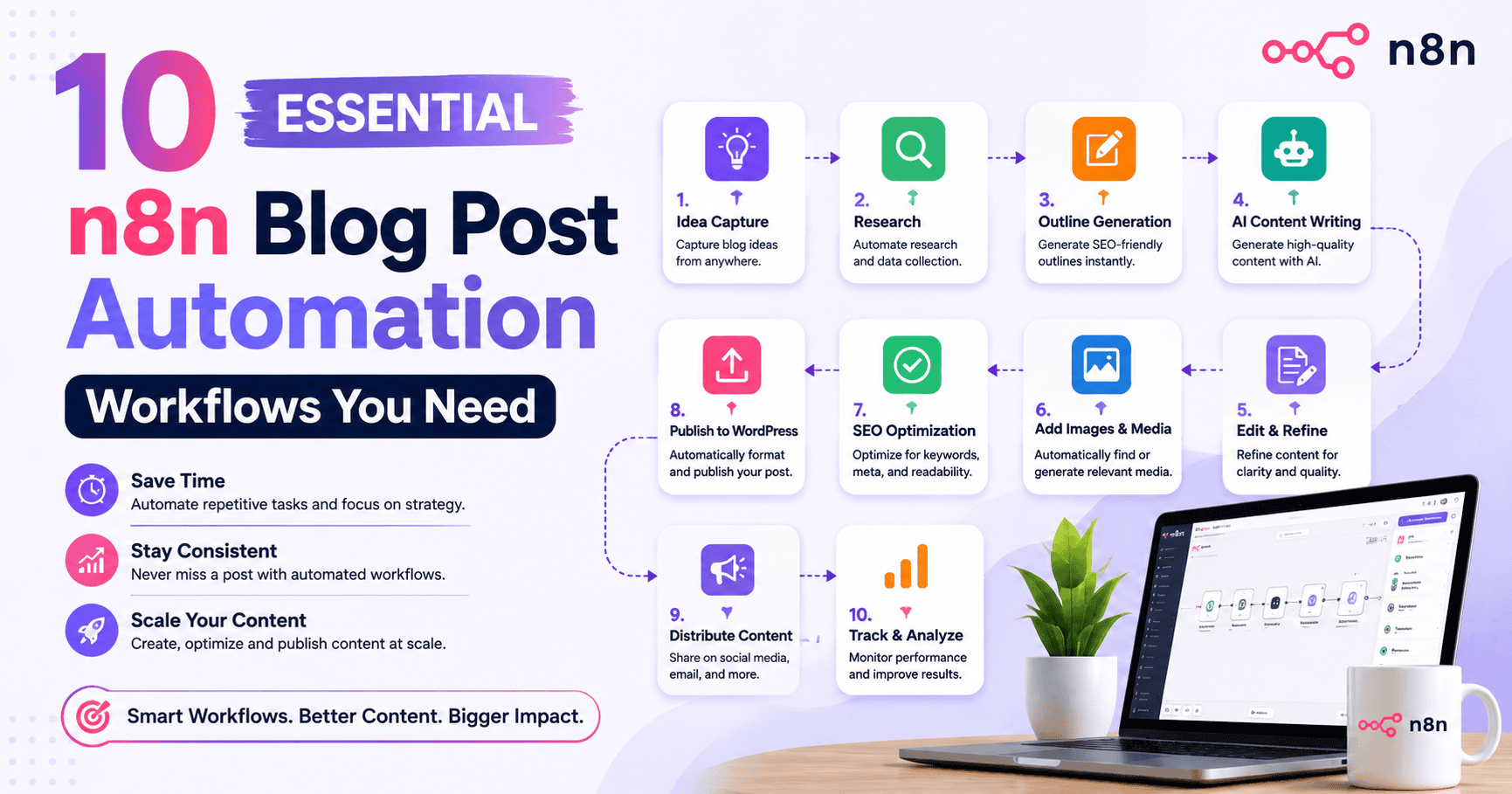
10 Must-Try n8n Blog Post Automation Workflows
n8n gives content creators a practical way to improve blog automation without building a heavy system. You can connect online services, reduce manual tasks, and shape custom digital pipelines that match your team’s publishing habits. That makes the automation process easier to manage.
In this guide, you will see workflows for publishing, drafting, cross-posting, scheduling, and research collection. Each one supports a stronger content workflow and helps you move from scattered tasks to a more controlled publishing system. Let’s look at the most useful setups first.
1. Automate Blog Publishing from Google Docs to WordPress
Yes, it is possible to publish blog drafts from Google Docs to WordPress automatically using n8n. This workflow starts with a manual trigger, then uses the Google Docs node to pull Google Docs content from your Google account. From there, a code node converts the full document structure into WordPress-ready HTML for blog publishing.
Next, wordpress api integration handles post creation and updates through WordPress REST and HTTP requests. This removes the manual transfer process and protects formatting across headings, lists, images, and code blocks. If you have asked how to fully automate publishing blog posts on WordPress, this is the clearest answer.
- Pull the complete document structure from google docs api with secure API access.
- Convert rich formatting, images, and lists into clean WordPress posts.
- Publish to your WordPress site with better quality and fewer manual tasks.
2. Generate AI-Powered Blog Content with GPT-4 and Perplexity Integration
If you want the best n8n workflow to generate AI-powered blog content in your brand voice, build a flow around an ai agent connected through API access. Use artificial intelligence for drafting and research support, then pass the output into your content workflow for review. This approach fits serious content creators who want faster content creation with more control.
A practical sequence is simple: trigger the workflow, send topic input to GPT-4, bring in supporting findings from Perplexity, and route the result into your editing step. That helps answer what steps are needed to use GPT-4 and Perplexity with n8n for blog creation. It also supports consistent blog length and cleaner blog article structure.
| Workflow Step | Purpose |
|---|---|
| Trigger or form input | Starts the automation process with topic or brief details |
| GPT-4 connection | Drafts blog content in a chosen brand voice |
| Perplexity connection | Adds relevant articles, latest news, and research support |
| Review node or code node | Cleans output and prepares content for publishing |
| Final delivery | Sends the draft into your content pipeline or publishing stage |
3. Cross-Post Blog Articles to Multiple Platforms Automatically
Cross-posting saves time when one blog article needs to appear in more than one place. With n8n, you can build a content pipeline that takes a published post and pushes it to social media or other different apps. This works well for solo blogger teams, marketing teams, and larger content operations that need fast distribution.
To set it up, start with the published article as the source. Then use HTTP requests or app connections to send that content to each target platform. n8n keeps the flow in a linear progression, so your team can track what was sent and when.
- Use one source post to trigger distribution across several platforms.
- Send updates through HTTP requests when built-in nodes are not available.
- Keep cross-posting inside one workflow for better boost efficiency and control.
4. Schedule and Publish Blog Posts with n8n Automation
Scheduling is one of the easiest ways to improve a weak publishing routine. n8n works as a workflow automation tool that lets you control when blog publishing happens, whether you start with a manual trigger or a planned release step. That gives you full control without adding more manual tasks.
For many teams, the value is consistency. A structured content workflow means drafts are prepared, checked, and sent live at the right time. Instead of relying on memory or last-minute uploads, you define the automation process once and repeat it. This is how you streamline blog post scheduling and publishing with automation in n8n.
- Start with a manual trigger when you want on-demand approval.
- Add scheduling steps to publish posts at planned times.
- Keep your content workflow transforms clean by linking review and release in one flow.
5. Source News and Research for Blogs Using n8n Workflows
Research collection can slow down blog content creation when you do it by hand. n8n helps by gathering latest news and relevant articles through API access, then feeding those findings into your content workflow. This is useful when you want fresher ideas, stronger outbound links, and better support for your blog posts.
The setup is direct. You connect trusted sources, collect structured results, and route them to a draft or review step. That reduces hours of manual work and gives content creators a repeatable system. If you are asking how to automate sourcing news or research for blogs with n8n, this is the most practical use case.
- Pull updates from connected sources with API access.
- Feed research into a draft, summary, or review stage.
- Add relevant articles and outbound links to improve blog content quality.
Conclusion
In conclusion, implementing n8n blog post automation workflows can significantly enhance your blogging efficiency and productivity. By automating essential tasks such as publishing, content generation, and cross-posting, you not only save time but also ensure a more streamlined and effective approach to content management. These workflows allow you to focus on what truly matters—creating quality content that engages your audience. As you explore these ten essential automation strategies, remember that the right tools can transform your blogging experience. We encourage you to share your thoughts and experiences in the comments below!
Frequently Asked Questions
How can I use n8n with AI automation services for blog content creation?
You can connect an ai agent to n8n through API access and place it inside your content creation flow. This workflow automation tool helps artificial intelligence handle drafting, research support, and formatting steps. Its automation capabilities make repeat work easier while keeping your team focused on review and publishing.
Is it possible to publish blog drafts from Google Docs to WordPress automatically using n8n?
Yes. n8n can pull drafts from google docs, process the content, and send it to WordPress through wordpress api integration. This automation process removes the manual transfer process, reduces formatting issues, and helps you publish blog posts faster with a more reliable workflow.
What are the top recommended n8n templates for automating blog writing and publishing?
The most useful templates are the ones built around blog publishing from Google Docs to WordPress, AI-assisted drafting, scheduled posting, and research collection. For content creators, a workflow automation tool using the google docs node and a clean content workflow offers the strongest starting point for repeatable publishing.