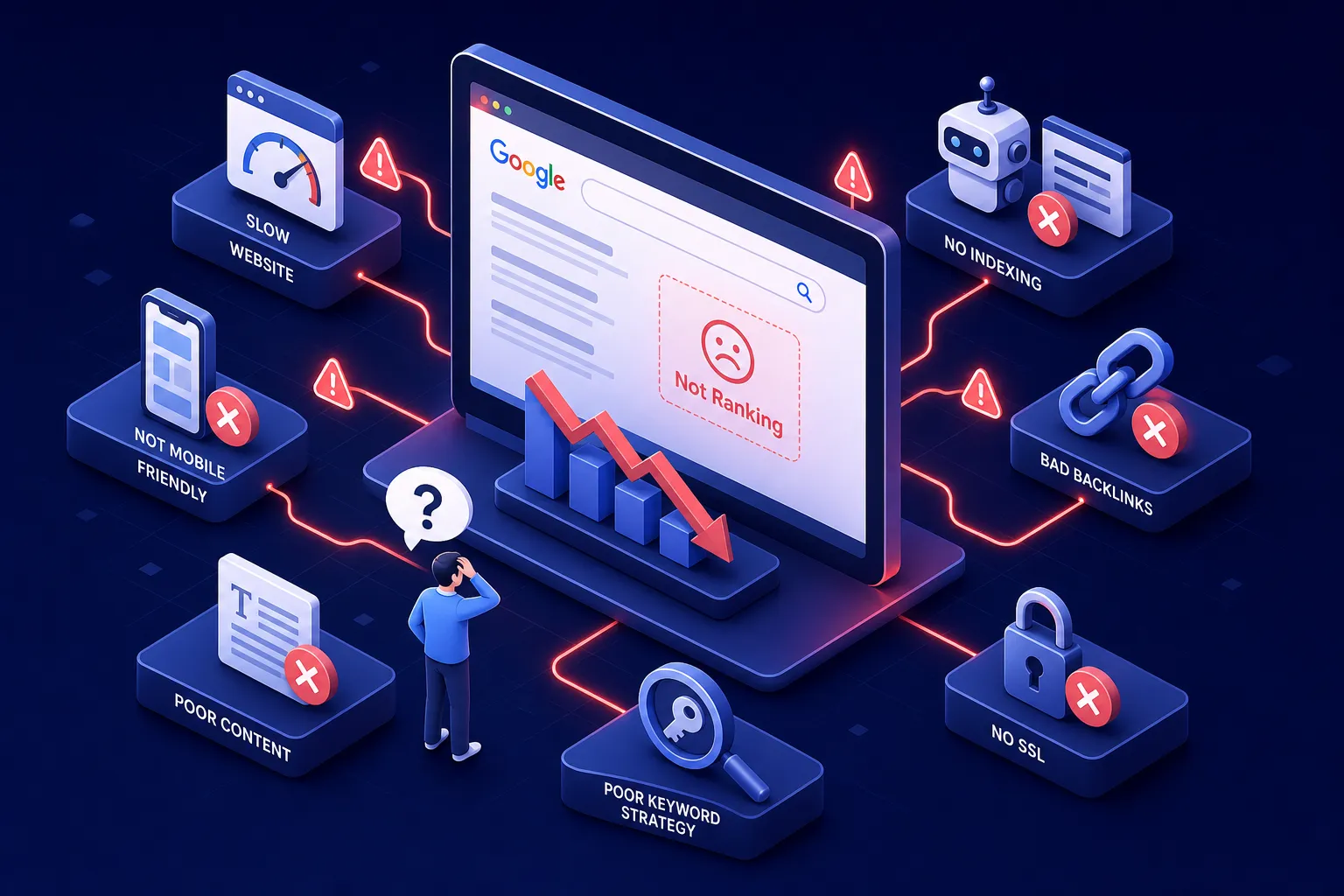
If you’re asking why your website isn’t ranking, you’re not alone, and the answer is rarely one single thing. You’ve written the content, optimized the pages, maybe even hired someone to “do SEO,” and yet your site still isn’t showing up on Google. The root cause is almost always diagnosable, and it almost always fits into one of a handful of categories: crawlability problems, technical failures, content gaps, authority issues, and on-page signal weaknesses.
At Brandleap Agency, we use a 10-checkpoint diagnostic framework, our proprietary approach to systematically uncovering why a site fails to rank and what to do about it in the right order. Work through each checkpoint in sequence. The earlier items are more foundational, so resolving them first often unlocks progress across everything else.
Why Is My Website Not Ranking? Start with Indexing
Why indexing is the first diagnostic step
No amount of SEO work matters if Google hasn’t indexed your pages. Before you touch a single title tag or build a single backlink, open Google Search Console and run two checks: the URL Inspection tool for individual pages, and the Page Indexing report for your overall indexed page count. If the URL Inspection tool returns “URL is not on Google,” that page is invisible to search, full stop.
You can also run a quick site:yourdomain.com search directly in Google to get a rough indexed page count, but treat that as an approximation. Search Console’s Page Indexing report is the authoritative source; it tells you not just how many pages are indexed, but why specific URLs were excluded.
The crawl blocks hiding in plain sight
A site can be fully live and still completely invisible to Googlebot. The three most common unintentional crawl blockers are: a robots.txt disallow rule left over from development, a noindex meta tag that was never removed after staging, and password-protected pages that Googlebot can’t access. Each of these causes a different indexing failure state in Search Console, so the report points you directly at which one applies.
Check your robots.txt file at yourdomain.com/robots.txt and look for any Disallow: / rules. Check your page source for . These are small configuration errors with outsized consequences. Fixing them can sometimes restore visibility within days once Googlebot recrawls, though exact timing varies depending on your site’s authority and crawl frequency.
2. Technical Errors That Quietly Suppress Your Rankings
Core Web Vitals: the performance threshold Google uses as a ranking signal
Google’s “good” thresholds for Core Web Vitals are LCP at or under 2.5 seconds, INP at or under 200ms, and CLS at or under 0.1. According to the HTTP Archive’s Web Almanac, most sites fail at least one of these: e-commerce sites pass Core Web Vitals at only a 42% rate, while SaaS sites pass at 61%. That means the majority of sites competing in your space are already operating below Google’s performance threshold.
Poor Core Web Vitals don’t cause a complete ranking wipeout, what they create is a ceiling. A well-optimized competitor that clears all three thresholds gains a page experience advantage that compounds over time. Run your pages through PageSpeed Insights and check the Core Web Vitals report inside Search Console to see exactly where you stand, broken down by mobile and desktop.
Mobile usability failures and server-level errors
Google indexes the mobile version of your site first. Mobile usability issues don’t just hurt the user experience; they directly affect how your pages rank. The Mobile Usability report in Search Console surfaces issues like text that’s too small to read, clickable elements too close together, and content wider than the screen.
Beyond mobile, check the Crawl Stats report under Settings in Search Console. Look for patterns of 404 errors, redirect chains, and 5xx server errors. These crawl efficiency problems compound over time: the more Googlebot wastes crawl budget on broken or slow-responding pages, the fewer of your good pages get crawled and indexed on each visit.
3. Content Problems That Give Google Nothing to Rank
Thin content, duplicate pages, and keyword cannibalization
Thin content isn’t just short content. Google defines thin pages as those that provide little or no unique value: auto-generated filler, scraped text, templated pages without meaningful human input, or shallow coverage that doesn’t actually satisfy the search query. A 2,000-word page can still be thin if it’s generic, repetitive, and adds nothing a searcher couldn’t find on the first five sites they visited.
Duplicate content across your own site splits PageRank and confuses Google about which URL to rank. Parameter-based URL variations, www vs. non-www inconsistencies, and identical content across multiple pages all create this problem. Keyword cannibalization is a related issue: when two or more of your pages compete for the same query, neither ranks well. Pull your Search Console Performance data, filter by impressions with low clicks, and you’ll find pages showing these symptoms immediately.
Search intent mismatches that tank click-through rates
Google categorizes search queries by intent: informational, navigational, commercial, or transactional. If your content format doesn’t match the intent behind the query, Google will rank it lower or not at all. A product page optimized for an informational query will produce a low click-through rate and a high bounce rate, signals that tell Google the page isn’t a good fit for that query, regardless of keyword presence.
The fastest way to evaluate intent is to look at the current top-ranking pages for your target query. If Google is serving blog posts and guides, a product page won’t compete there. For example, a query like “best project management software” returns comparison listicles, not product pages, that’s a commercial-intent SERP with a clear format expectation. Align your page format, structure, and depth with what’s already winning in that SERP.
4. Authority Gaps and Backlink Problems Holding Your Domain Back
What a weak backlink profile signals to Google
Backlink signals are Google’s proxy for trust and authority. Third-party metrics like Moz Domain Authority or Ahrefs Domain Rating are useful heuristics for measuring this, but they are not Google’s internal metric, the underlying concept is that sites earning links from credible, relevant sources rank better, even when on-page SEO is solid. Ahrefs benchmark data indicates that moderately competitive keywords typically require 40 to 50 referring domains, while high-competition niches like finance or insurance can demand 300 or more. A new site with fewer than 20 to 30 referring domains will struggle against established competitors in most niches, regardless of content quality.
Audit your backlink profile using tools like Ahrefs, Semrush Backlink Analytics, or Moz Link Explorer. Each shows your referring domain count, a domain-level authority score, and a timeline of new versus lost links. The trend matters as much as the total: a site losing links faster than it gains them is weakening, even if the absolute count looks reasonable.
Toxic backlinks and unnatural link patterns
Spammy, purchased, or manipulative links can trigger manual actions or algorithmic penalties. Both show up in Search Console under Security and Manual Actions. If you see a manual action notification, that’s a direct signal from Google’s team, not an algorithm flag, and it requires a formal reconsideration request after cleanup.
Use Semrush’s Backlink Audit or a comparable tool to flag suspicious links. The Google Disavow tool exists as a last resort for genuinely harmful link patterns, not a first response. Most sites don’t need to disavow anything; the problem is usually a lack of strong links rather than an excess of bad ones.
5. On-Page Signals and E-E-A-T Factors Google Weighs
Title tags, internal links, and on-page structure
The most common on-page mistakes are duplicate title tags, missing or generic H1s, no clear topical signals early in the content, and a broken or absent internal linking structure. Each of these weakens the signal Google receives about what your page is about and how it relates to the rest of your site.
Internal links are how PageRank flows through your site. Pages with no internal links pointing to them are effectively orphaned and rarely rank, even if the content is excellent. Run a crawl with Screaming Frog or Sitebulb to surface orphaned pages, duplicate title tags, and missing metadata across your entire site in minutes.
E-E-A-T and why Google evaluates your site’s credibility
E-E-A-T stands for Experience, Expertise, Authoritativeness, and Trustworthiness. It’s the framework Google uses to assess whether your content is credible enough to rank, particularly in competitive or sensitive categories. The practical signals Google uses as proxies include author bylines with verifiable credentials, detailed About pages, clear contact information, HTTPS, and original research or firsthand perspective, strong E-E-A-T signals that generic content simply can’t replicate.
YMYL niches, health, finance, and legal specifically, face a higher E-E-A-T bar than other categories. If your site operates in one of these verticals and lacks visible author credentials, a clear organizational identity, or external recognition from reputable sources, that’s a credibility gap Google’s quality systems will penalize regardless of your technical SEO.
6. Still Not Ranking After Checking All of This?
How to prioritize your fixes for the fastest recovery
The repair sequence matters. Fix indexing and crawl blocks first, since nothing else works if Google can’t access your pages. Address Core Web Vitals and technical issues second. Then audit your content for thin pages, consolidate duplicates, and align pages to search intent. Build authoritative backlinks and clean up on-page signals last, those improvements take the most time to reflect in rankings.
As for timelines: technical fixes can sometimes show improvement within 2 to 4 weeks once Googlebot recrawls your updated pages, though results vary by site. Content quality and authority improvements often take 3 to 6 months to meaningfully shift rankings. Fixing multiple things simultaneously makes it harder to identify what actually moved the needle, so a structured sequence gives you both faster results and cleaner diagnostics.
When a professional SEO audit makes sense
Some businesses work through every checkpoint on this list and still don’t rank. That usually points to one of three underlying problems: a highly competitive niche where the authority gap is larger than surface-level metrics suggest, accumulated technical debt across hundreds or thousands of pages that a manual review can’t fully surface, or content and E-E-A-T issues that require a trained eye to diagnose correctly.
That’s where a structured professional audit adds real value. At Brandleap Agency, the site audit process applies this same diagnostic framework at a depth that individual tools and manual checks can’t match. The team identifies the specific root causes suppressing your rankings, prioritizes fixes by impact, and builds a clear action plan with realistic timelines. If you’ve worked through this list and still can’t identify what’s holding your site back, a free audit consultation with the Brandleap team maps out exactly what’s suppressing your rankings and in what order to fix it.
Start with the Foundation, Then Build Up
If you’re still asking why is my website not ranking after running through these checkpoints, the answer is almost always traceable to one or more of these 10 categories, and most are fixable with the right tools and a clear sequence. The diagnostic mindset is what separates businesses that recover visibility from those that keep optimizing in the wrong direction for months.
The sequence is the same every time: start with indexing, move to technical, then content, then authority. Each layer depends on the one before it. Fixing a thin content problem on a page Google can’t crawl accomplishes nothing. Fixing a backlink gap on a site with Core Web Vitals failures produces less lift than it should.
Run the checks, document what you find, and address the highest-impact items first. If the root cause still isn’t clear after a full diagnostic pass, a professional SEO audit from Brandleap Agency will surface exactly what’s holding your site back and give you a concrete plan to fix it.
Frequently Asked Questions About Website Rankings
1. Why is my website not ranking on Google?
A website may fail to rank because of indexing problems, technical SEO issues, weak or thin content, poor search intent alignment, insufficient backlinks, or weak on-page SEO signals.
2. How do I check if my website is indexed by Google?
Use Google Search Console’s URL Inspection tool for individual pages and the Page Indexing report to check your site’s overall indexing status.
3. Can a noindex tag stop my website from ranking?
Yes. A noindex directive tells Google not to include the page in its search index, which prevents that page from appearing in organic search results.
4. Does website speed affect Google rankings?
Website performance can affect SEO and user experience. Poor Core Web Vitals, slow loading times, and mobile performance issues can make it harder to compete with better-optimized pages.
5. What is thin content in SEO?
Thin content is content that provides little unique or useful value to searchers. Even a long page can be considered thin if it is generic, repetitive, or does not properly answer the search query.
6. What is keyword cannibalization?
Keyword cannibalization happens when multiple pages on the same website compete for the same or very similar search queries, making it harder for Google to determine which page should rank.
7. Why are backlinks important for Google rankings?
Backlinks from credible and relevant websites can strengthen your site’s authority and trust signals. A weak backlink profile can make it difficult to compete against established websites.
8. How important are internal links for SEO?
Internal links help Google discover pages, understand your website structure, and distribute authority throughout the site. Pages without internal links can become orphaned and struggle to rank.
9. How long does it take for SEO fixes to improve rankings?
Technical improvements may sometimes show results within a few weeks after Google recrawls the site. Content, authority, and backlink improvements usually require several months to create meaningful ranking changes.
10. What should I fix first if my website is not ranking?
Start with indexing and crawlability issues first. Then address technical SEO, content quality and search intent, followed by backlinks, authority, internal linking, and other on-page SEO signals.